Customization & integration
Test a Customized SWAT Model
Compare research code with the official model using common inputs.
In research, SWAT source code is often modified to add features or integrate new algorithms. Demonstrating an improvement normally requires comparison with the official, unchanged SWAT model.
SWAT Output Viewer can compare outputs from two SWAT versions at multiple spatial and temporal scales using charts, tables, and statistics. The engines may be official releases or customized research versions.
Compare two SWAT versions
1. Add the executables
Place the executables for both SWAT versions in the swat_exes folder. The viewer includes several standard engines, and compatible custom engines can be placed in the same folder.

2. Run both versions
Open a SWAT project, select its scenario in Project Explorer, choose the first engine from the list, and run it. Repeat the simulation with the second engine.

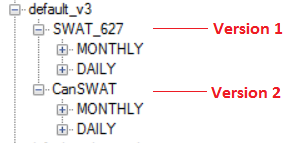
After both simulations, Project Explorer contains a model-version node for each engine. In this example, SWAT_627 and CanSWAT were run against the same scenario, so their outputs can be compared directly.
3. Select an output
Expand one model-version node and select the result to compare—for example, subbasin SNOMELTmm.
4. Choose the comparison engine
Use the Compare with list to select the other model version.
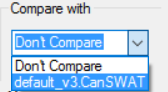
The chart displays both series together. The current model is shown in red and the comparison model is shown in blue.

Compatibility note
The SWAT output system must support separate results for multiple engines in the same scenario. If your customized engine is not recognized, contact support@swatviewer.com.